Best Free PNG to JPG Converter Online – Convert Images Without Losing Quality
If you’ve ever tried uploading a PNG image somewhere and got hit with that annoying “file not supported” message, you know the struggle is real. PNGs look great — crisp, transparent, perfect for design — but not every platform plays nice with them. Sometimes, you just need a quick way to turn PNG to JPG without wrecking the quality or wasting time downloading software.
That’s where the Best Free PNG to JPG Converter Online from Free Calculation Tools comes in. It’s simple, fast, and doesn’t make you jump through hoops. Whether you’re a student submitting an online form, a designer resizing an image for web use, or someone cleaning up their phone gallery, this online converter does the job with just a few clicks.
Here’s the thing — not all converters are built the same. Some blur your image, others slap a watermark, and a few ask you to sign up just to get your photo back. Yikes. But with Free Calculation Tools, it’s all about ease and trust. You upload, click convert, and download — that’s it. No hidden steps, no pop-ups, and no surprise compression that ruins your image.
And honestly, you’ll be surprised how often you’ll need this tool. Think about it: most social media platforms prefer JPG for uploads. Websites compress PNGs heavily to save space. Even email attachments are lighter when they’re in JPG format. That’s why having a free online converter that keeps your quality intact isn’t just convenient — it’s essential.
Plus, it’s not just about switching file types. It’s about control. You get to decide how your image looks and feels — whether you want high resolution for printing or smaller file sizes for online sharing. With Free Calculation Tools, you can finally say goodbye to “conversion anxiety” and hello to a simple, dependable solution.
→ [Insert internal link here]
What Is a PNG to JPG Converter?
A PNG to JPG converter is a simple online or offline tool that changes an image’s format from Portable Network Graphics (PNG) to Joint Photographic Experts Group (JPG). Why does this matter? Because each format serves a different purpose.
- PNG is great for transparency, design projects, and graphics with text or logos.
- JPG, on the other hand, is perfect for photos, websites, and general sharing because it’s smaller and loads faster.
So, when you use a converter, you’re basically asking the tool to transfer your PNG image into a JPG format — while keeping your image’s clarity as close to the original as possible.
And the best part? You don’t need to install anything. Online converters like Free Calculation Tools do it right in your browser. No technical know-how, no downloads, no fancy editing apps.
Here’s a quick example: imagine you’ve just created a transparent logo in PNG format, but your client wants it as a JPG for their brochure. Instead of reopening your design software, exporting, and re-saving manually, you can just upload it to Free Calculation Tools, hit “convert,” and it’s done — in seconds.
This simple shift from PNG to JPG might sound small, but for people who manage digital content daily — bloggers, marketers, students, or even photographers — it’s a massive time-saver.
If you’re curious about how these formats differ technically, you can read more on Wikipedia’s article on JPEG — it’s a great overview of how image compression works behind the scenes.
Why Do You Need an Online Converter?
Let’s be real — not everyone has Photoshop or fancy editing tools lying around. Sometimes you just need a quick fix that doesn’t slow you down.
That’s exactly what Free Calculation Tools was built for: helping everyday users solve small but important digital problems instantly.
Here’s why people prefer online converters:
- No installation required: You can convert images straight from your browser.
- Faster conversions: Just upload and hit convert. Done.
- Free forever: You don’t need to buy premium plans or enter your credit card info.
- Accessible anywhere: Whether you’re on your phone, tablet, or laptop, it works flawlessly.
- No quality loss: The best part — your photo looks just as sharp as the original.
And if you’re wondering whether online converters are safe — yes, as long as you’re using trusted sites like Free Calculation Tools, where your images aren’t stored or shared.
Alright, let’s walk through how the Free Calculation Tools PNG to JPG Converter actually works.
The beauty of it is—you don’t need to be a tech wizard. Everything happens right inside your browser in just a few quick steps.
Here’s the simple process:
- Open the converter page
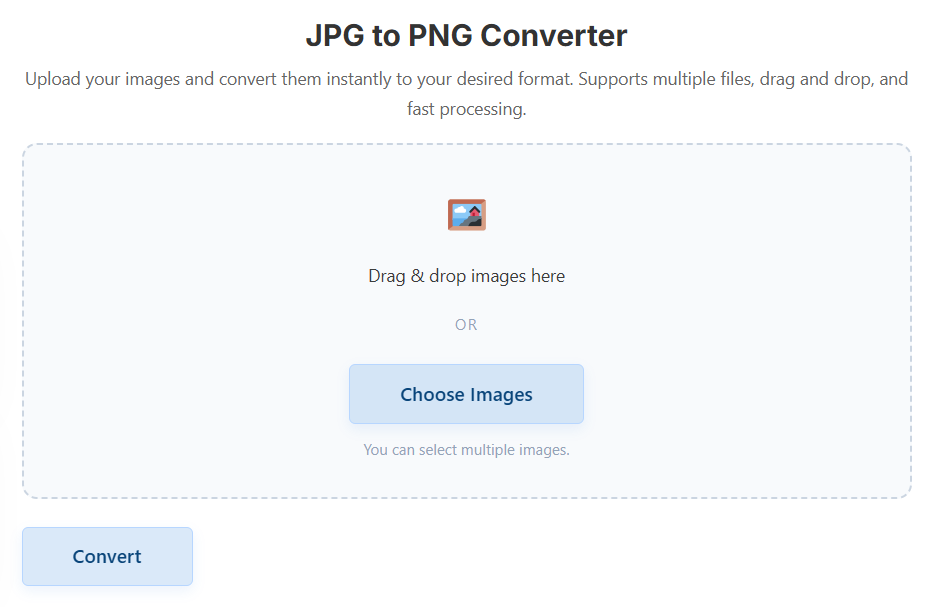
Head over to Free Calculation Tools – PNG to JPG Converter. You’ll see a clean, straightforward interface—no confusing menus or pop-ups. - Upload your PNG file
Click on the “Upload” button and select your PNG image. You can even drag and drop it if that’s easier. The tool instantly reads your file. - Click ‘Convert’
One tap. That’s all it takes. The converter automatically turns your PNG image into a high-quality JPG while keeping the details sharp. - Download your new JPG
Once it’s done, hit the “Download” button, and your file is ready to go. It takes seconds, not minutes.
There’s no waiting in line, no software installation, and no registration wall. Everything runs smoothly in your browser. And because Free Calculation Tools uses advanced compression logic, you don’t lose image clarity—just file size.
Here’s a quick scenario:
You’re submitting a job application online. The form only accepts JPGs, but your passport photo is in PNG format. Instead of hunting for an app or begging your friend for help, you just open the converter, upload, and in 10 seconds—boom—you’ve got your JPG ready to submit.
Key Features of the PNG to JPG Converter
Let’s be real: there are tons of image converters out there. So, what makes Free Calculation Tools stand out?
It’s the small things that add up to a smoother, more reliable experience.
Here’s what users love most:
1. No Quality Loss
Your photo looks just as sharp after conversion. The tool uses smart algorithms to minimize compression blur—keeping the original quality intact.
2. Fast Browser-Based Conversion
No downloads, no installations, no waiting. Everything happens in seconds through your internet browser.
3. Totally Free to Use
No premium versions, no hidden fees, no subscriptions. The converter is completely free for everyone.
4. Secure & Private
Your images aren’t saved on servers. Once you download your converted file, it’s gone—ensuring full privacy.
5. Multi-Device Friendly
Use it on your phone, tablet, or computer—it works perfectly on any device and any browser.
6. Supports Batch Conversion (Coming Soon)
While it currently handles one image at a time, a multi-file upload feature is being added to make conversions even faster for bulk users.
7. Designed for Everyday Use
From students and teachers to marketers and bloggers, anyone who needs quick image conversions will find this tool ridiculously handy.
And here’s the best part: you don’t have to create an account.
Just open, upload, convert, and download. Done.
Benefits of Using Free Calculation Tools
Now let’s talk about what really matters—why you should use this tool instead of the dozens of others you might find online.
1. You Save Time
You don’t have to open complex editing software. In less than 15 seconds, you can upload and convert a PNG to JPG—and get back to what you were doing.
2. You Get Consistent Results
Some free converters reduce quality or change colors. Not here. The Free Calculation Tools converter keeps the tones, saturation, and brightness true to the original.
3. It Works on Any Internet Speed
Even if your connection isn’t blazing fast, the converter is lightweight and optimized for slower networks too.
4. Great for Professionals and Beginners
No confusing steps, no tech talk. It’s made for everyone—from a student editing a presentation to a digital marketer resizing images for web speed.
5. Eco-Friendly on Your Device
No software installation means no memory consumption. It doesn’t clutter your storage or slow down your system.
6. Backed by a Trusted Platform
Thousands of people already use Free Calculation Tools for different digital needs—whether it’s financial calculations, health tracking, or utility tools. The image converter adds another trusted feature to that lineup.
If you’re curious about the difference between PNG and JPEG compression, check out Wikipedia’s detailed explanation. It’s a great deep dive for anyone who loves the technical side of things.
Who Can Use It?
Here’s the cool part — anyone can use this converter. You don’t need to be a designer or know anything about file formats. If you can click a button, you’re good to go.
Let’s look at who benefits the most from the Free Calculation Tools PNG to JPG Converter:
1. Students & Teachers
Submitting online forms or uploading assignments often requires JPG format. Instead of downloading extra apps or converting images one by one, this tool helps you get it done instantly — right in your browser.
2. Bloggers & Content Creators
Websites load faster when they use JPGs instead of PNGs. If you run a blog or upload visuals regularly, converting images helps improve SEO and reader experience. Plus, your posts won’t slow down mobile visitors — a win-win.
3. Small Business Owners & Marketers
Running an online store or digital campaign? This converter helps resize and optimize your product images without losing clarity. That means faster page load times, happier customers, and better rankings.
4. Photographers & Designers
Even if you work with high-resolution PNGs, sometimes a client or platform needs JPGs. With this free online converter, you can keep full control of your image quality without firing up Photoshop or Lightroom.
5. Everyday Users
Got family photos or memes in the wrong format? You don’t need to install anything — just upload, convert, and share. Simple as that.
Example:
Imagine you’re applying for a government ID and they only accept photos in JPG format. Instead of downloading random conversion software, you use Free Calculation Tools, upload your PNG, click convert, and you’re done — safely and instantly.
Comparison Table
Here’s a quick look at how Free Calculation Tools compares to other online image converters:
| Feature | Free Calculation Tools | Typical Online Converter | Paid Software (e.g., Photoshop) |
|---|---|---|---|
| Free to Use | ✅ Yes | ⚠️ Limited access | ❌ Requires license |
| Quality Retention | ✅ Excellent | ⚠️ Moderate | ✅ Excellent |
| Conversion Speed | ⚡ Instant | ⚡ Average | ⏳ Slower for batch files |
| No Installation | ✅ Browser-based | ⚠️ Some need extensions | ❌ Needs download |
| Privacy & Security | ✅ Images auto-deleted | ⚠️ May store files | ✅ Local only |
| Multi-Device Access | ✅ Works on all devices | ⚠️ Desktop-only | ⚠️ PC required |
| User-Friendly Interface | ✅ Clean and simple | ⚠️ Ad-heavy | ⚠️ Complex |
| Signup Required | ❌ No | ⚠️ Sometimes | ❌ No |
| Batch Conversion | 🔜 Coming soon | ⚠️ Often limited | ✅ Yes |
When you look at it, it’s pretty clear: Free Calculation Tools gives you professional-level performance without the complexity or cost.
FAQs
1. Does converting PNG to JPG reduce image quality?
Technically, JPGs use compression, but the Free Calculation Tools converter keeps the difference minimal. You’ll hardly notice any loss — just smaller file sizes.
2. Is it safe to upload my photos?
Absolutely. The converter doesn’t store or share your files. Once you download your converted image, it’s automatically removed from the server.
3. Can I convert images on mobile?
Yes! The converter works perfectly on smartphones and tablets, whether you’re using Chrome, Safari, or any browser.
4. How is this converter different from others?
It’s free, fast, and privacy-focused. No pop-ups, no signups, and no waiting. Plus, it’s part of a trusted ecosystem of tools built by Free Calculation Tools — the same platform known for handy financial and utility calculators.
5. Will there be more image converters added?
Yes! The team is working on expanding to include JPG to PNG, WebP converters, and even PDF to image tools soon.
Let’s be honest — sometimes the simplest tools make the biggest difference. Whether you’re working on a school project, managing a website, or organizing your photo gallery, having a free, reliable PNG to JPG converter saves you time and frustration.
With Free Calculation Tools, you can:
- Convert images instantly.
- Keep your photo quality intact.
- Skip annoying ads or downloads.
- Work from any device, anywhere.
It’s quick, secure, and 100% free — exactly what online tools should be.
So, next time you need to turn PNG to JPG or transfer JPG to PNG, skip the complicated software. Just head to Free Calculation Tools and get it done in seconds — no signups, no fuss, just results.